Description
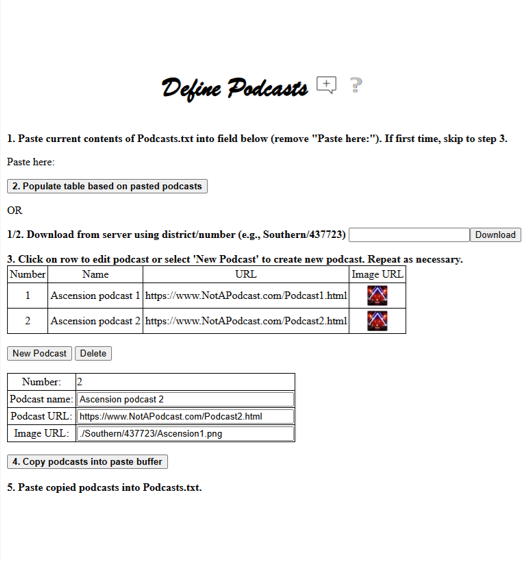
The "Define Podcasts" webpage is used to define the podcasts for a specific church such that a user of that church's Hub homepage can access those podcasts. The podcasts defined via this website should be saved in a Podcasts.txt file (process is described later) that should be included with the other church files sent when the specific church's definitions have been completed.
If this webpage is used to define the podcasts for the church, then the podcasts input field on the Define General Info webpage should be set to use the Hub link (as opposed to another link on that church's website for accessing the podcasts).
The user of the church's Hub webpages will see the podcasts, along with other podcasts from the LCMS, in a tree showing the information from the "Define Podcasts" webpage.

If podcasts are defined using this webpage and the podcasts input field on the Define General Info webpage is set to use the Hub link, then the podcasts image will be added to the Extended column on the Church Information webpage allowing direct access from that webpage to the podcasts.
Procedure
The process for creating, populating and persisting the podcast information involves the following steps:
The first time this webpage is accessed, since there is no previously saved Podcasts.txt file and since the default seeded files for the church do not include Podcasts.txt, steps 1 and 2 can be skipped and the process should begin with step 3 (defining a new podcast)
If the podcasts have previously been saved to a local Podcasts.txt file, then the contents of that file should be copied and pasted into the "Paste here:" field overwriting the "Paste here:" text (step 1) and then clicking the "Populate table based on pasted podcasts" (step 2)
If the podcasts have previously been loaded to the server, then, as an alternative to the previous bullet, the contents of the Podcasts.txt file on the server can be accessed by specifying the folder (e.g., Southern/437723) and then selecting the Download button
As step 3, new entries can be added to the table by clicking the "New Podcast" button and filling in the input fields for that podcast. This process should be repeated for each podcast to be added
When all the podcast entries have been added, the podcast information should be copied to the clipboard using the "Copy podcasts into paste buffer" button
The clipboard contents should be pasted into a local Podcasts.txt file that will ultimately be included with the set of delivered files
Creating and Editing Entries
The "New Podcast" button creates a new podcast and populates it with default values. These values can then be modified as desired using the input fields at the bottom.
Clicking a cell in a row of the table will populate the input fields at the bottom, allowing that entry to be edited as desired.
Input Fields:
Number: System assigned number for the podcast.
Name: Name of the podcast.
URL: URL to access the podcast.
Image URL: URL for the image that is hyperlinked to the podcast after the podcast name in the end user webpage. If a file is specified that is not already available on the Internet, this file should be included with those sent for the church and should be identified with "./folder/filename" (e.g., ./Southern/437723/Ascension2.png).
Saving podcasts to Podcasts.txt
The "Copy podcasts into paste buffer" command button should be used to copy the podcasts defined on this webpage into the paste buffer (clipboard). Once copied, the podcasts should be pasted into a local Podcasts.txt file that should then be included with the files sent when the church definition is complete.