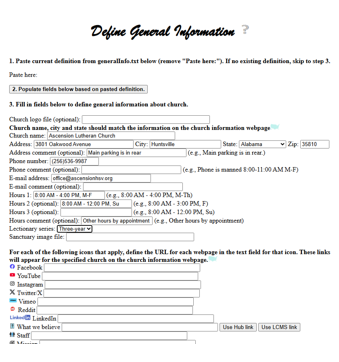
The Define General Info webpage is used to define general information for a specific church. The information defined via this webpage largely drives the contents and behavior of that church's Lutheran Hub home page (and related webpages).
The information defined via this webpage is persisted to a generalInfo.txt file, one of two required files for each church. Since this is a required file, each of the churches has been seeded with a generalInfo.txt file, which should be downloaded as the first step in the process for defining the general information for the church.
Therefore, the first time this webpage is accessed, the field for folder should be defined and the Download button used to download the information from the server and populate the text fields on the webpage based on the contents of the generalInfo.txt file from the server. Subsequent uses of this webpage should copy the contents of the local generalInfo.txt file (created during the first access to this webpage) into the "Paste here:" field (step 1) followed by clicking the "Populate fields below based on pasted definition" button (step 2).
Once the fields for a particular church have been defined (step 3), the button labeled "Copy definition to paste buffer (clipboard)" should be clicked (step 4) to copy the contents of the webpage to the clipboard followed by pasting those copied contents into a local (i.e., on this computer) file named generalInfo.txt (step 5) for subsequent sending of all the church information via an email to me.
The remainder of this help document describes the input text fields on this webpage and the impact of each of those fields on the church's (Hub) webpages.
The input fields define what images appear in the header for the church's (Hub) homepage and related webpages. The fields also define, to a certain extent, the content of the various webpages.
The screenshot below is for a typical church webpage header. Above and below the various images in the church header is a very brief description of those images.

Church logo file: If specified, this URL identifies the image at the far left of the church's home page. If this file is not already available via the Internet, then it can be included with the other files for the church that are sent via email. If available on the internet, this should be the full URL address. If not available on the Internet, then the file specification should be a dot followed by a slash (./) followed by the folder, another slash and the filename (e.g., ./Southern/437723/Logo.png).
Church name: The name of the church. This should match the name on the Church Information webpage. This name appears immediately after the church logo file (if specified) in the header for the church's home page.
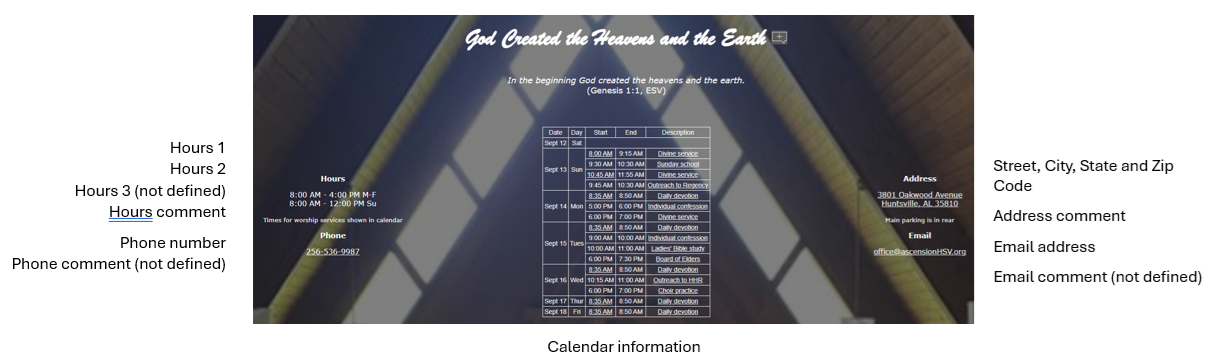
Address: The street address for the church. This should match the address specified for the church on the Church Information webpage. This address appears on the church's home page in the rightmost column with the sanctuary picture background.
City: The city location for the church. This should match the city specified for the church on the Church Information webpage. This city appears on the church's home page in the rightmost column (under the street address) with the sanctuary picture background.
State: The state location for the church. This should match the state specified for the church on the Church Information webpage. This state's abbreviation appears on the church's home page in the rightmost column (under the street address) with the sanctuary picture background.
Zip code: The zip code for the church. The zip code is included with the street address, city and state in the rightmost column on the church's home page.
Address comment (optional): Comment that appears in small letters directly underneath the address information on the church's home page.
If the street address, city, state or zip code information specified in the general information disagrees with the information on the Church Information webpage, the Church Information webpage will be updated to match this information.
Phone number: Phone number for the church. This should match the phone number specified for the church on the Church Information webpage. If this information disagrees with the information on the Church Information webpage, the Church Information webpage will be updated to match this information. The phone number appears at the bottom of the left column on the church's home page.
Phone comment (optional): Comment that appears in small letters directly underneath the phone number on the church's home page.
E-mail address: Email address for the church. This should match the email address for the church as specified via the e-mail image for the church on the Church Information webpage. If this information disagrees with the information on the Church Information webpage, the Church Information webpage will be updated to match this information. The email address appears at the bottom of the right column on the church's home page.
E-mail comment (optional): Comment that appears in small letters directly underneath the email address on the church's home page.
Hours 1: Primary hours of operation for the church. These hours should include the days of the week to which they apply. This information appears at the upper left on the church's home page.
Hours 2 (optional): Secondary hours of operation for the church. As for the primary hours, these hours should include the days of the week to which they apply. If specified, these hours will appear directly below the primary hours on the church's home page.
Hours 3 (optional): Tertiary hours of operation for the church. As for the primary and secondary hours, these hours should include the days of the week to which they apply. If specified, these hours will appear directly below the secondary hours on the church's home page.
Hours comment (optional): Comment that appears in small letters directly underneath the hours (of operation) on the church's home page.
Lectionary series: Indication whether the church follows the one-year or the three-year lectionary series.
Sanctuary image file (optional): Picture (typically .jpg or .png) of the sanctuary that is used as a background on the church's home page and other webpages that use the Hub default information. This image file should include a dot and slash (./), the folder (e.g., Southern/437723), and ending with the filename. Therefore, "./Southern/437723/Ascension1.png" would indicate that the folder is Southern/437723 and that the filename in Ascension1.png. Although specifying a value in this field is optional, it is strongly encouraged that a value be supplied.
All of the remaining input fields are optional and all involve the specification of a URL, so specifying a value for any of them is left to the user. Many of them have a button that can be used to use the standard Lutheran Hub link for that purpose. A few of them have a button to use an LCMS webpage for this purpose. If a value is specified, then the image tied to that URL will appear both at the top of the church's home page and in the Extended column for the church on the Church Information webpage (only if a URL other than the default Hub or LCMS link is specified with the exception that the image for Sermons, Bible studies, Newsletters, Serve and Give will appear if the value is specified using the Hub link). The image at the left of the line is the image that will be used on the home page and in the Extended column.
Church home page. If the church has its own website, this should specify the URL for that website. This information should match the information for the website on the Church Information webpage. If this information disagrees with the information on the Church Information webpage, the Church Information webpage will be updated to match this information. If a church chooses to use the Hub's webpage for the church as its webpage, then the full URL including the "https://www.LutheranHub.com/ChurchHome.html?f=" should be included in the URL.
Facebook. The URL for the church's Facebook webpage.
YouTube. The URL for the church's YouTube webpage.
Instagram. The URL for the church's Instagram webpage.
Twitter/X. The URL for the church's Twitter/X webpage.
Vimeo. The URL for the church's Vimeo webpage.
Reddit. The URL for the church's Reddit webpage.
LinkedIn. The URL for the church's LinkedIn webpage.
What we believe. The URL for the church's webpage that states the beliefs of the church.
Staff. The URL for the church's webpage that identifies the staff members (at least the pastor) for the church.
Mission. The URL for the church's webpage that defines the mission or goal for the church.
History. The URL for the church's webpage that defines history of the church. The Hub link, if used, includes a brief history of the LCMS rather than the specific church.
Visit. The URL for the church's webpage that includes information of use to a visitor to that church.
Join. The URL for the church's webpage that includes information of use to an individual wishing to join that church.
Stained glass. The URL for the church's webpage that describes the stained glass windows for that church.
Music ministry. The URL for the church's webpage that describes the music ministry for that church.
Lectionary. The URL for the church's webpage that describes the lectionary used by that church.
Sacraments. The URL for the church's webpage that describes the LCMS sacraments.
Newsletter(s). The URL for the church's webpage that contains the latest newsletter(s) for the church. If the choice is made to use the Hub link for this purpose, then the e-mailed files sent to me should include Newsletter.txt that is defined using the Define Newsletters webpage.
Sermon(s). The URL for the church's webpage that contains the latest sermon(s) or service(s) for the church. If the choice is made to use the Hub link for this purpose, then the e-mailed files sent to me should include Sermons.txt that is defined using the Define Sermon Library webpage.
Bible studies. The URL for the church's webpage that contains the latest Bible study(-ies) for the church. If the choice is made to use the Hub link for this purpose, then the e-mailed files sent to me should include BibleStudies.txt that is defined using the Define Bible Studies webpage.
Calendar. The URL for the church's webpage that contains the calendar for the church.
School. The URL of the home page for the school associated with the church.
Give. The URL for the church's webpage that can be used to donate online to the church.
Serve. The URL for the church's webpage that shows service opportunities within the church. If the choice is made to use the Hub link for this purpose, then the e-mailed files sent to me should include Serve.txt that is defined using the Define Sermon Library webpage.
Contact. The URL for the church's webpage that contains a contact form for visitors, for people needing assistence, etc.
Radio station. The URL for the church's radio staion.
Podcast. The URL for the church's podcasts.
Online service. The URL for the church's online service broadcast.