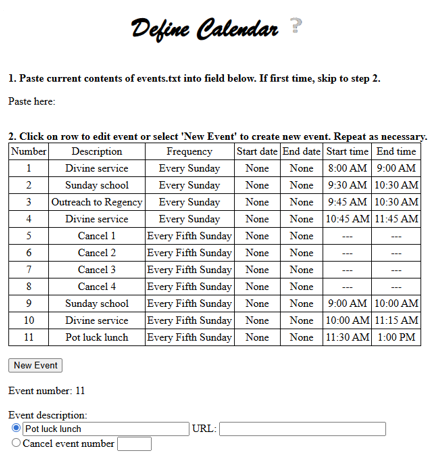
The Define Calendar webpage is used to define the calendar information for a specific church. The information defined via this webpage drives the calendar information shown on the church's (Hub) homepage and possibly the information shown when the calendar image is clicked for the church's (Hub) header (if the Hub link is being used for the calendar).
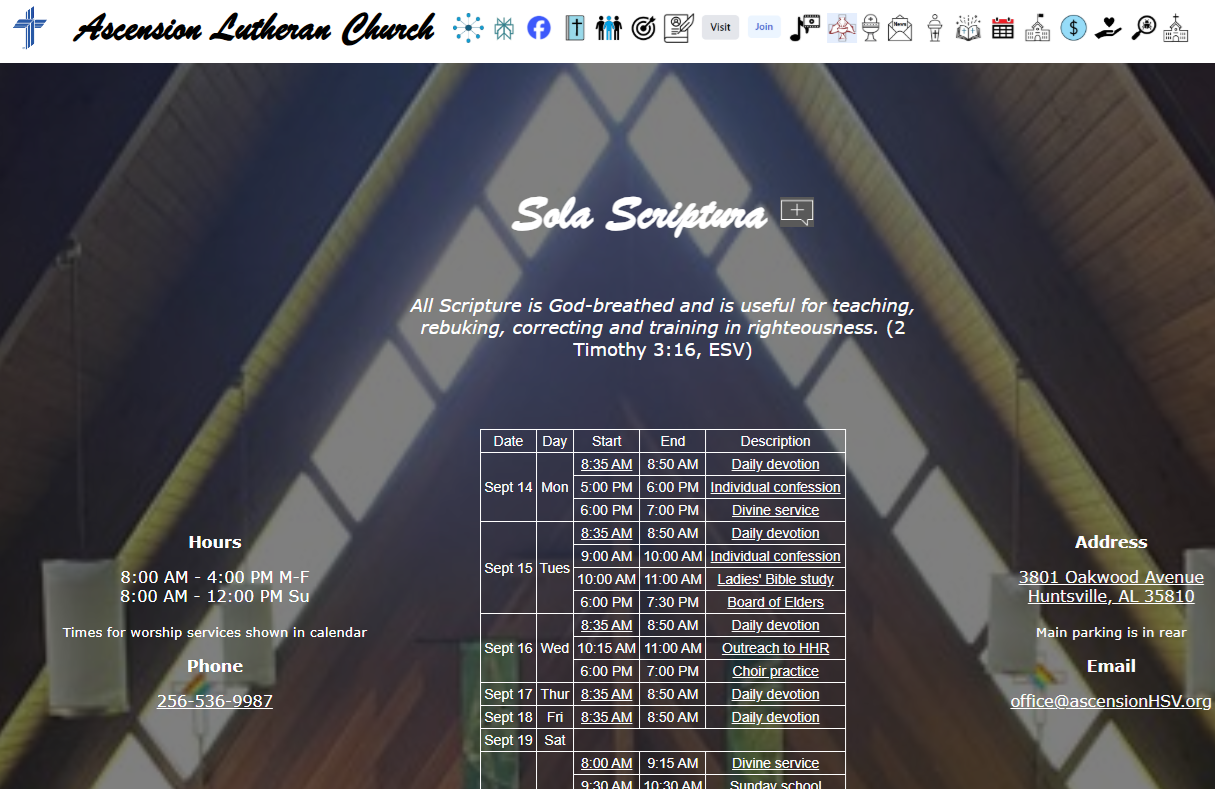
The following screenshot shows the calendar information displayed on the church's Hub homepage. Note that the information for each day is presented in the order in which those events are ordered within the Define Calendar webpage. Also note that all events containing a description URL are hyperlinked to the description webpage specified for that event. Also note that all events containing a Join URL have their starting times hyperlinked to that URL.
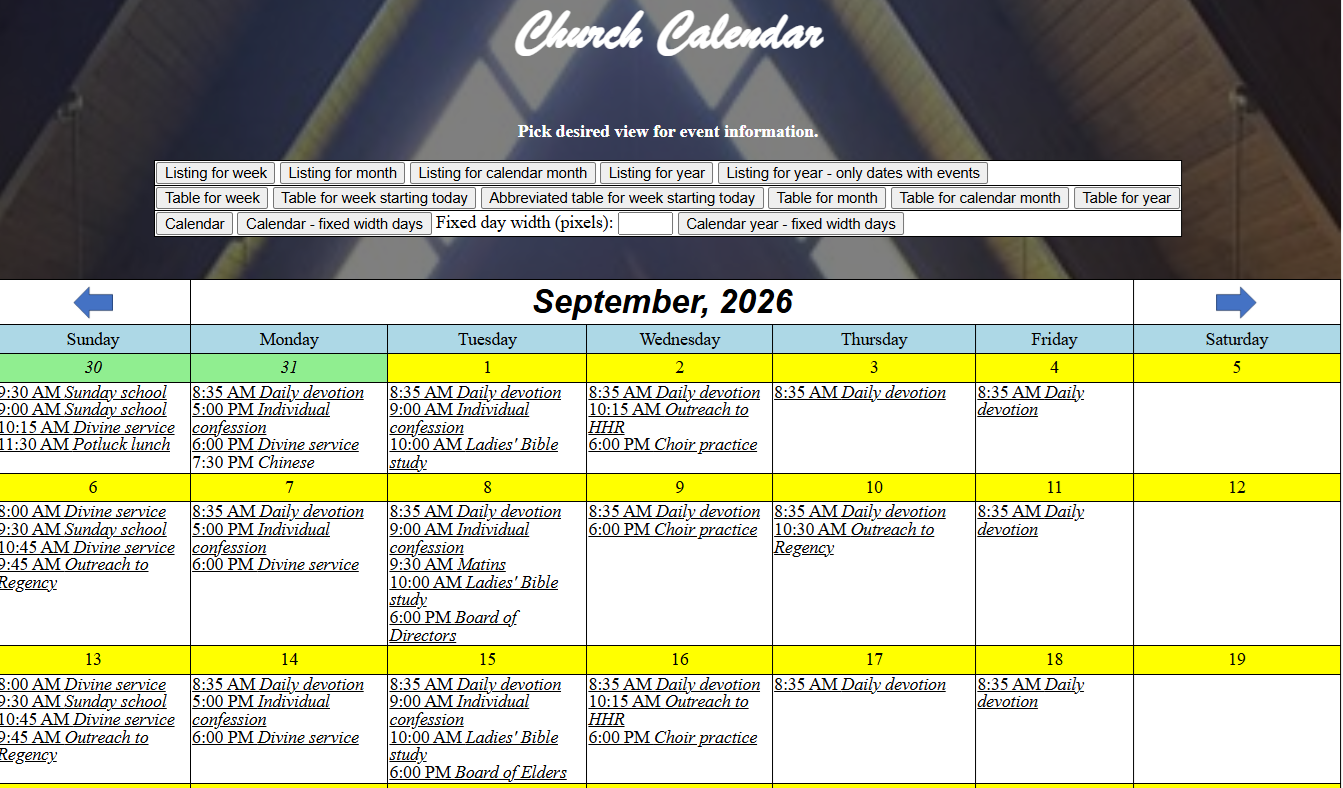
If the Calendar URL specified via the Define General Info uses the Hub link, then the calendar events display using the following webpage.
The events defined via this webpage are used to populate the events.txt file, one of two required files for every church. Since this file is required, all of the churches have been populated with the (worship) events (including times) defined for that church and accessible via the LCMS Locator webpage.
Functionality
Since events.txt is a required file, each church has been seeded with the information accessible via the LCMS Locator webpage. Therefore, the first time this webpage is accessed for a specific church, the folder should be used to populate the information on this webpage. Subsequent accesses of the webpage should use the copied contents of the locally persisted events.txt file.
Events should be added, repositioned (using "Move Up" and "Move Down") and deleted as desired. When the definitions are completed, the "Copy events into paste buffer" button should be clicked to copy the events into the paste buffer (clipboard). Once copied, the events should be pasted into a local events.txt file, which should eventually be included with the set of set of files sent to me.
Event information
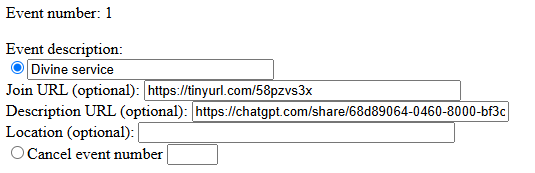
Event number: System assigned number for the event
Event description: Brief desription of the event. All events, with the exception of cancel events, must be given a description
Join URL (optional): URL to join the event remotely. If this is not possible for an event, this field should not be defined.
Description URL (optional): URL to a long description for the event. This field is optional. For many events, a description generated using a chatbot and then shared makes for a good long description.
Location (optional): Location of the event. If implicit, such as a worship service happening at the church, this value need not be included.
Cancel event number: Only applies if the event is a cancellation of another event, in which case the number of the event to be canceled should be specified. Cancel events are required when a regularly scheduled event is time shifted (e.g., worship times on fifth Sundays or special event days).
Event frequency
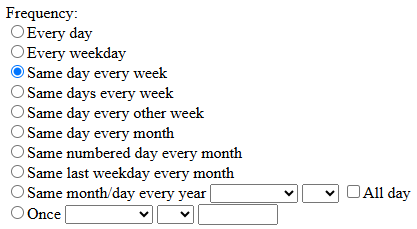
Specifies how frequently an event occurs:
Every day. Event happens every day (typically within a specified period of days).
Every weekday. Event happens every weekday (Monday through Friday)
Same day every week. Event happens on the same day every week (e.g., worship service on Sunday of every week)
Same days every week. Event happens on the same days every week
Same day every other week. Event happens on the same day of every other week.
Same day every month. Event happens on the same day every month (e.g., Second Tuesday)
Same numbered day every month. Event happens on the same numbered day of every month (e.g., the first day of the month)
Same last weekday every month. Event happens on the same last day of each month (e.g., last Sunday of the month)
Same month/day every year. Event happens on the same month and day of every year (e.g., December 25th). Checking "All day" is an indication that there is not a specific time during that day for that event.
Once. Event happens one time. Requires identifying the month, day and year for the event.
Every day event
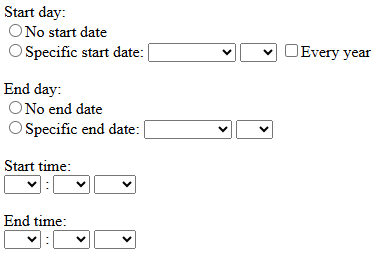
Specifies the date range for the every day event:
Start day: Specifies the start day for the every day event. If the event has no start date, then the "No start date" option should be checked. Otherwise, the specific start month, day and year should be specified. If the event is recurring on the same days every year, then, rather than specifying a specific year, the "Every year" check box should be selected.
End day: Specifies the end date for the event. If the event has no end date, then the "No end date" option should be checked
Start time: Starting time for the every day event.
End time: Ending time for the every day event.
Every weekday event
Specifies the date range for the every weekday (M-F) event:
Start day: Specifies the start day for the every weekday event. If the event has no start date, then the "No start date" option should be checked. Otherwise, the specific start month, day and year should be specified. If the event is recurring on the same days every year, then, rather than specifying a specific year, the "Every year" check box should be selected.
End day: Specifies the end date for the event. If the event has no end date, then the "No end date" option should be checked
Start time: Starting time for the every weekday event.
End time: Ending time for the every weekday event.
Same day every week event
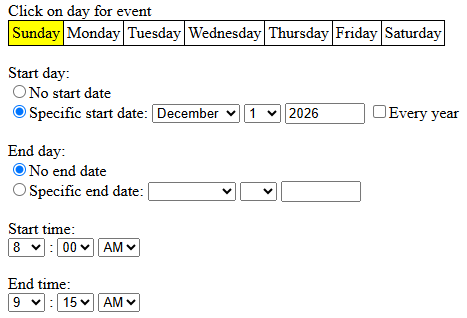
Specifies the day of the week, and date range, for the same day every week event:
Days of the week: Clicking on a day sets that day of the week for the event
Start day: Specifies the start day for the same day every week event. If the event has no start date, then the "No start date" option should be checked. Otherwise, the specific start month, day and year should be specified. If the event is recurring on the same days every year, then, rather than specifying a specific year, the "Every year" check box should be selected.
End day: Specifies the end date for the event. If the event has no end date, then the "No end date" option should be checked
Start time: Starting time for the same day every week event.
End time: Ending time for the same day every week event.
Same days every week event
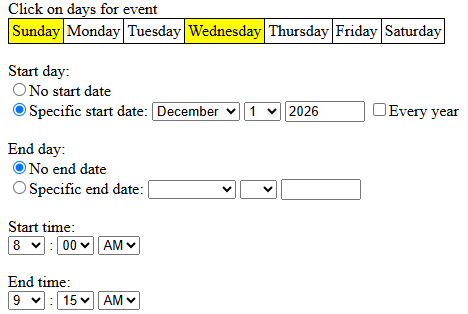
Specifies the days of the week, and date range, for the same days every week event:
Days of the week: Clicking on a day sets/unsets that day of the week as one of the days for the event
Start day: Specifies the start day for the same days every week event. If the event has no start date, then the "No start date" option should be checked. Otherwise, the specific start month, day and year should be specified. If the event is recurring on the same days every year, then, rather than specifying a specific year, the "Every year" check box should be selected.
End day: Specifies the end date for the event. If the event has no end date, then the "No end date" option should be checked
Start time: Starting time for the same days every week event. If the start time or end time for a day of the week is different then the others, then it should be a separate event.
End time: Ending time for the same days every week event.
Same day every other week event
Specifies the date range for the same day every other week event:
Start day: Specifies the start day for the same day every other week event. This day should be the first day that the event occurs and is used to determine the two week intervals. Since this date defines the first day for the event, the "No start date" is not a valid selection. Likewise, the "Every year" check box is not a valid option for this event.
End day: Specifies the end date for the event. If the event has no end date, then the "No end date" option should be checked
Start time: Starting time for the same day every other week event.
End time: Ending time for the same day every other week event.
Same day every month event
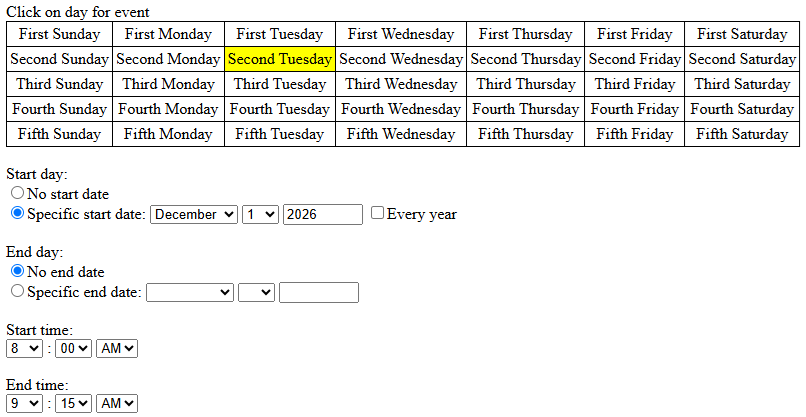
Specifies the day of the month, and date range, for the same day every month event:
Days of the month: Sets the specific relative day for the event. Clicking a specific day sets that day as the day of the month for this event.
Start day: Specifies the start day for the same day every month event. If the event has no start date, then the "No start date" option should be checked. Otherwise, the specific start month, day and year should be specified. If the event is recurring on the same days every year, then, rather than specifying a specific year, the "Every year" check box should be selected.
End day: Specifies the end date for the event. If the event has no end date, then the "No end date" option should be checked
Start time: Starting time for the same day every month event.
End time: Ending time for the same day every month event.
Same numbered day every month event
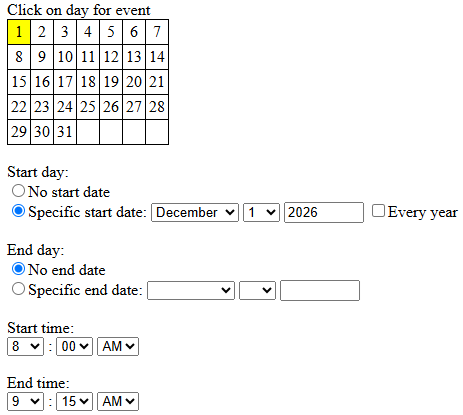
Specifies the numbered day of the month, and date range, for the same numbered day every month event:
Numbered days of the month: Sets the specific numbered day of the month for the event. Clicking a specific day sets that day as the numbered day of the month for this event.
Start day: Specifies the start day for the same day every month event. If the event has no start date, then the "No start date" option should be checked. Otherwise, the specific start month, day and year should be specified. If the event is recurring on the same days every year, then, rather than specifying a specific year, the "Every year" check box should be selected.
End day: Specifies the end date for the event. If the event has no end date, then the "No end date" option should be checked
Start time: Starting time for the same day every month event.
End time: Ending time for the same day every month event.
Same last weekday every month event
Specifies the day of the week, and date range, for the same last day every month (e.g., last Sunday) event:
Day of the week: Clicking on a day sets that day of the week for the event
Start day: Specifies the start day for the same day every week event. If the event has no start date, then the "No start date" option should be checked. Otherwise, the specific start month, day and year should be specified. If the event is recurring on the same days every year, then, rather than specifying a specific year, the "Every year" check box should be selected.
End day: Specifies the end date for the event. If the event has no end date, then the "No end date" option should be checked
Start time: Starting time for the same last weekday every month event.
End time: Ending time for the same last weekday every month event.
Same month/day every year event
Specifies the date range for the same month/day every year event:
Start day: Specifies the start day for the same month/day every year event. If the event has no start date, then the "No start date" option should be checked. Otherwise, the specific start month, day and year should be specified. If the event is recurring on the same days every year, then, rather than specifying a specific year, the "Every year" check box should be selected.
End day: Specifies the end date for the event. If the event has no end date, then the "No end date" option should be checked
Start time: Starting time for the same month/day every year event.
End time: Ending time for the same month/day every year event.
Once event
Specifies the starting and ending times for the one-time event:
Start time: Starting time for the one-time event.
End time: Ending time for the one-time event.
Closing comments
The order of the events on this webpage is the order in which the events will occur in the calendar. Therefore, it is strongly recommended that events with an earlier starting time precede other events that start at a later time. Events can be moved up and down in the list to get the desired order.
Cancel events should always come after the events that they cancel. Otherwise, they will have no effect.